


Your client relationships deserve more than spreadsheets and sticky notes. The right CRM for financial advisors makes the difference between struggling with daily tasks and building meaningful client connections. Most advisory firms waste 12-15 hours weekly on tasks their CRM could handle automatically.
Selecting a CRM platform feels like comparing apples to spaceships. Monthly costs bounce between $14 and $330. Feature lists read like technical manuals. Each vendor claims their solution works best for advisors. Our team tested every major CRM option to cut through the noise and identify true winners for 2025.
This guide walks you through proven solutions – from Salesforce’s powerhouse platform to Wealthbox’s advisor-friendly system. Think of it as your personal CRM matchmaker, helping you find the perfect fit for your practice size, service model, and budget. We’ve analyzed core features, pricing structures, and real-world performance to give you clarity in your decision.
Salesforce Financial Services Cloud: Enterprise-Grade CRM for Financial Advisors
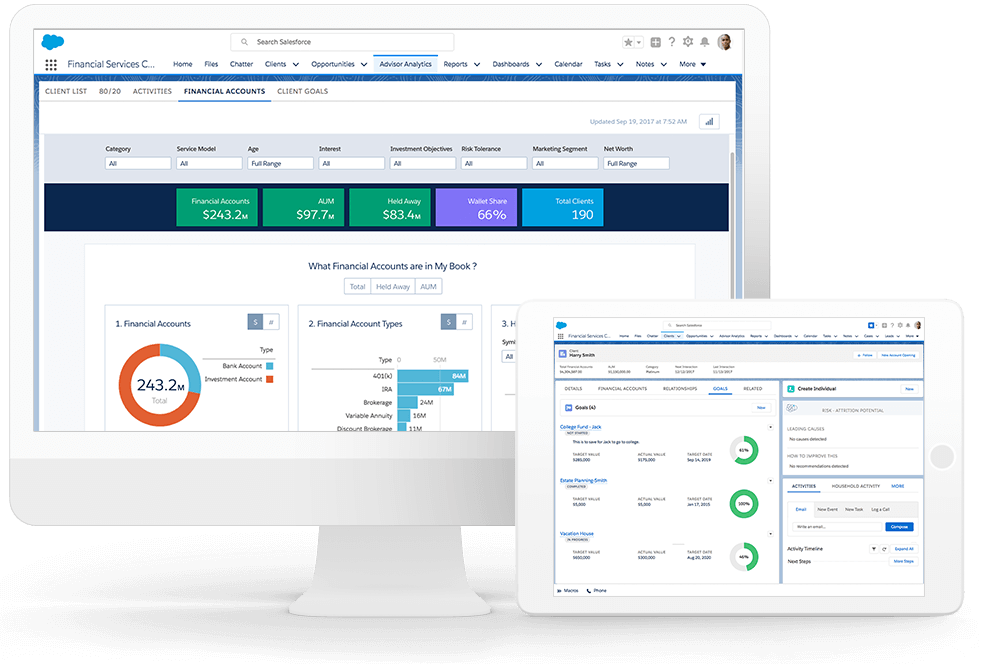
Image Source: Salesforce
Think of Salesforce Financial Services Cloud as your practice’s digital command center. While smaller CRMs offer basic tools, this platform stands tall as the Ferrari of wealth management technology. Most enterprise firms choose Salesforce when they outgrow basic solutions and need serious horsepower.
Key Features and Capabilities
Picture your ideal workday – client details at your fingertips, tasks running on autopilot, and insights flowing effortlessly. Salesforce makes this reality through 360-degree client profiles that capture every interaction, preference, and milestone. Your team sees the complete story behind each relationship, not just scattered data points.
The platform’s “magic buttons” feature turns hour-long tasks into 60-second wins. These smart automation tools handle client onboarding, money movements, and other time-draining tasks. One advisor reported saving 15 hours weekly on routine processes – time better spent building client relationships.
Client segmentation tools help you group and serve clients strategically. Track life events, map relationships, and spot opportunities for deeper engagement. Many advisors tell us these features help them spot opportunities they previously missed.
Integration Ecosystem
Your tech stack should work together like a well-oiled machine. Salesforce connects with approximately 4,500 other applications, from marketing tools to accounting software. Data flows automatically between systems, eliminating manual updates and duplicate entries.
AI-Powered Analytics
Einstein Analytics serves as your digital crystal ball, spotting patterns human eyes might miss. This AI assistant analyzes client behavior, predicts opportunities, and suggests next best actions. The system learns from every interaction, helping you deliver increasingly personalized service.
Pricing and Value Assessment
Premium capabilities come at premium prices. Monthly investment runs between $300-$700 per user:
- Sales Cloud – $300/user/month
- Service Cloud – $300/user/month
- Sales and Service – $325/user/month
- Einstein 1 for Sales and Service – $700/user/month
Annual contracts required for all editions.
Pros and Cons for Advisory Firms
Pros:
- Customize workflows without coding expertise
- Automate tedious tasks that drain productive hours
- Build deeper client relationships through data insights
- Meet compliance requirements across 40+ global regulations
- Scale technology as your practice grows
Cons:
- Premium pricing may stretch smaller firm budgets
- Complex setup often requires dedicated IT support
- Steeper learning curve for new team members
- Some versions limit lead management features
- Storage costs increase with practice growth
For growing firms ready to invest in enterprise-grade technology, Salesforce Financial Services Cloud delivers Ferrari-level performance. The platform helps you scale operations while keeping the personal touch that built your practice.
Wealthbox: User-Friendly CRM Designed for Financial Advisors

Image Source: Wealthbox
Most CRMs feel like they were built by engineers for engineers. Wealthbox breaks this mold. Financial advisors tell us this platform feels like using their favorite social media app – simple, intuitive, and actually enjoyable to use. Your team might actually thank you for choosing this one.
Intuitive Interface and Collaboration Tools
Remember the last time you watched your team struggle with clunky software? Wealthbox solves this headache through its activity stream – picture LinkedIn for client management. Your team sees real-time updates, shares progress, and stays coordinated without endless email chains.
Tasks link directly to client records and households, creating a digital paper trail that makes sense. One advisor shared how his team cut meeting prep time by 50% using Wealthbox’s automated workflows. The drag-and-drop pipeline builder turns opportunity tracking from a chore into child’s play.
Integration with Financial Planning Software
Your tech stack should play nicely together. Wealthbox connects with over 150 leading custodial platforms and wealthtech applications. The RightCapital integration stands out – one click moves client data between platforms.
“Wealthbox is an increasingly popular CRM solution and its intuitive design combined with RightCapital’s robust financial and tax-planning capability is a powerful combination,” notes Shuang Chen, RightCapital’s CEO.
Smart additions like fpPathfinder bring financial planning checklists right into your CRM. Advisors save flowchart notes directly to client records, keeping recommendations organized and compliant.
Mobile Accessibility
Your office travels with you. Wealthbox’s mobile apps mirror the web version’s simplicity. The “Today” view surfaces urgent items like upcoming meetings and hot opportunities. Quick actions – click-to-call, one-tap emails – keep you responsive on the move.
Speaking of mobility, the voice dictation feature lets you capture meeting notes hands-free. Running late to a client meeting? Built-in maps guide you there.
Pricing Structure
Three clear choices plus enterprise options:
| Plan | Price (per user/month) | Key Features |
| Basic | $59 | 1 CRM workspace, 1 opportunity pipeline, 2GB storage |
| Pro | $75 | 3 CRM workspaces, 5 opportunity pipelines, 5GB storage |
| Premier | $99 | 5 CRM workspaces, 10 opportunity pipelines, 10GB storage |
| Enterprise | Custom pricing | 20GB storage, API access, advanced administrative controls |
Test drive any plan free for 14 days – no credit card needed. Annual payments save you money versus monthly billing.
Small to mid-size advisory firms love Wealthbox for its perfect balance – sophisticated enough to handle complex needs, simple enough that your whole team actually uses it. Sometimes the best technology is the one that feels like it’s not there at all.
Redtail CRM: Streamlined Solution for Small to Mid-Size Practices

Image Source: Redtail Technology
Small advisory firms face a common dilemma – complex CRMs drain resources, while basic tools limit growth. Redtail CRM solves this puzzle. This cloud-based platform hits the sweet spot between power and simplicity, making it a favorite among growing practices.
Client Data Management Features
Your client relationships tell stories worth keeping. Redtail’s data organization system captures every chapter – from first meetings to milestone achievements. Teams particularly value the note-taking features that turn scattered conversations into searchable knowledge.
“If it’s not in Redtail, it never happened” – this mantra echoes through successful advisory practices. Smart customization options let you track exactly what matters to your practice. Create custom fields for anything from risk tolerance to wine preferences, helping you remember the personal touches that build lasting relationships.
Many advisors tell us Redtail’s individual and team-level customization drives consistent usage across their practice. Quick filters and advanced search tools turn mountains of client data into actionable insights.
Document Storage and Organization
Paper chaos kills productivity. Redtail Imaging tames the document monster with SEC-compliant digital storage. Recent updates brought modern touches to document management:
- Drag files straight into client records
- Upload entire folders at once
- Archive old documents without losing them
- Control who sees what with permission settings
Access everything from anywhere with internet connection. The system automatically preserves records on WORM media, keeping you aligned with SEC 17a-(4) requirements.
Seminar Management Tools
Client seminars work twice as hard in Redtail. The same tools that track event attendance also power email campaigns and prospect nurturing. No more lost opportunities after events – the system ensures every interested attendee receives proper follow-up.
Mobile Capabilities
Client meetings rarely stay in the office. Redtail’s free mobile app puts client details, tasks, and schedules in your pocket. While it doesn’t mirror every desktop feature, the app handles essential client management on the go. Some advisors wish for more mobile functionality, especially those who primarily work remotely.
Cost-Effectiveness Analysis
Smart pricing makes Redtail especially attractive for growing firms:
- Launch Plan: $39/user/month (annual) or $45/month (monthly) – up to 5 users
- Growth Plan: $59/user/month (annual) or $65/month (monthly) – unlimited users
- Enterprise Plan: Custom pricing with minimum commitment
Every plan includes core CRM features, workflow automation, and professional reporting. Test everything free for 30 days before deciding.
Unlike generic CRMs that need expensive customization, Redtail speaks advisor language out of the box. Connections to over 100 financial tools create a seamless tech ecosystem for your practice.
Small and mid-size firms love Redtail for striking the right balance – powerful enough to support growth, simple enough to use daily, and priced right for growing practices.
Zoho CRM: Affordable Option with Robust Customization [link_14]
Image Source: Zoho
Smart advisory firms know expensive doesn’t always mean better. Zoho CRM proves this point. While other platforms drain your technology budget, Zoho delivers enterprise-grade features at small-firm prices. Your wallet stays happy, and your practice gets the tools it needs.
AI-Powered Assistant (Zia)
Meet Zia – your digital team member who never sleeps. Unlike clunky automation tools, Zia feels more like a skilled assistant who anticipates your needs. Speak or type your requests, and watch work happen.
Zia brings four game-changing capabilities to your practice:
- Predictive analytics spots your hottest opportunities before they cool
- Anomaly detection catches unusual patterns you might miss
- Best time to contact tells you when clients most likely answer
- Email sentiment analysis reads between the lines of client messages
Picture finishing client notes while driving to your next meeting – Zia’s voice commands make it possible.
Customization Options for Financial Services
Cookie-cutter CRMs force you into their mold. Zoho lets you build your perfect system. The platform’s multi-page layouts create custom spaces for different service lines.
Your practice gains:
- Canvas Design Studio – build interfaces that match your workflow
- Custom modules – track exactly what matters to your clients
- Workflow automation – stay compliant without extra effort
- Blueprints – guide your team through complex processes
Client data stays safe with bank-grade encryption, GDPR settings, and HIPAA compliance features.
Integration Capabilities
Your tech tools should work together like a symphony, not a garage band. Zoho conducts this orchestra beautifully, connecting with 150+ essential apps:
- Money matters: QuickBooks, Xero, Zoho Books
- Paperwork: DocuSign, Adobe Sign
- Marketing: Email platforms for client nurturing
- Daily tools: Google Workspace, Microsoft 365
Say goodbye to copying data between systems. Everything flows automatically, giving you more time for clients.
Pricing Tiers and Value
Smart pricing that makes enterprise features accessible:
| Plan | Monthly Price (per user) | Key Features for Advisors |
| Standard | $20 | Mass email, validation rules, sales forecasting |
| Professional | $35 | Inventory management, CPQ, email insights |
| Enterprise | $50 | Zia AI, territory management, multi-user portals |
| Ultimate | $65 | Advanced AI capabilities, enhanced customization |
Pay annually and pocket 20% savings. Solo advisors and tiny teams rejoice – practices with three or fewer users can start free.
Budget-conscious advisory firms find their match in Zoho CRM. This platform proves you don’t need deep pockets to access premium features – just smart choices.
Junxure: Comprehensive CRM Built by Financial Advisors

Image Source: AdvisorEngine
Most CRM vendors claim to understand financial advisors. AdvisorEngine CRM proves it. Created by advisors who felt the pain of ill-fitting technology, this platform speaks your language. While other CRMs adapt general tools for advisory work, Junxure started with your workflow in mind.
Client-Centric Features
Client relationships generate mountains of data. AdvisorEngine CRM turns this data mountain into a goldmine. The redesigned Client Profile puts every detail at your fingertips – no more clicking through endless screens to find what you need.
Storage limits shouldn’t dictate your service quality. Unlike penny-pinching competitors, AdvisorEngine offers unlimited data storage. The secure Document Vault keeps your paperwork organized and compliant without nickel-and-diming your practice.
Workflow Automation
Your processes define your practice. Junxure’s workflow automation – recognized by CIO Review as “Most Promising” – turns your best practices into repeatable success. One advisor reported cutting new client onboarding time by 60% using these tools.
Smart categorization (compliance, client service, business development) keeps your team aligned as you grow. The activity feed feels like mission control for your practice – every important action visible in real-time.
Integration with Custodial Platforms
Your custodial relationships matter. AdvisorEngine CRM connects with more than 20 custodians and major portfolio systems, including:
- Schwab Advisor Center’s digital account opening
- TD Ameritrade’s Veo platform for secure data access
- Fidelity’s account information integration
Everything lives where you need it – client data, workflows, and transactions all in one place.
User Experience Considerations
Speed kills frustration. AdvisorEngine’s recent makeover delivered pages that load 10x faster. Modern navigation and drag-and-drop customization let you make the platform truly yours.
Fair warning – powerful tools take time to master. But AdvisorEngine’s training team ensures your practice squeezes every drop of value from your investment. Many advisors tell us the learning curve feels more like a steady ramp than a steep wall.
Monday CRM: Flexible Platform for Team Collaboration

Image Source: Monday.com
Most CRMs feel like solving a Rubik’s cube blindfolded. Monday CRM hands you the solution key. This visual powerhouse turns client management into something closer to Pinterest than PowerPoint. Your team might actually enjoy using this one.
Visual Pipeline Management
Picture your sales pipeline as a living, breathing organism. Monday’s Kanban view brings this vision to life. Client cards flow naturally between stages – just grab and drag. The color-coded dashboard tells stories at a glance, helping your team spot hot opportunities before they cool.
Want to track AUM, insurance sales, and planning clients differently? Monday adapts to your style, not the other way around. One advisor told us she cut pipeline review meetings from hours to minutes using these visual tools.
Customizable Dashboards
Numbers tell stories. Monday CRM’s dashboards make these stories sing. Choose from 15+ widgets to build your perfect command center. Your options include:
- Deal stages that show exactly where money moves
- Funnel charts revealing where prospects stick or slip
- Revenue forecasts that help you see around corners
Watch your practice pulse in real-time. No more waiting for end-of-week reports to spot trends.
Automation Capabilities
Regulations demand perfection. Your time demands efficiency. Monday’s no-code automation squares this circle. Build workflows that assign leads, schedule reviews, and alert your team when clients engage with important messages.
Those mind-numbing daily tasks – follow-ups, scheduling, reminders? Monday handles them while you sleep. One wealth manager reported gaining back 8 hours weekly from automation alone.
Pricing and Scalability
Growth-friendly pricing that won’t break the bank:
| Plan | Price (per user/month) | Key Features |
| Basic | $12 | Unlimited customizable pipelines, contact management |
| Standard | $17 | Two-way email integration, AI email generation |
| Pro | $28 | Sales forecasting, email tracking, mass emails |
| Enterprise | Custom | Lead scoring, team goals, advanced analytics |
Teams need three users minimum to start – that’s $36 monthly. Fair warning: while Monday flexes to fit your practice, thoughtful setup pays dividends. Think of it like training a new team member – invest time upfront for long-term collaboration gains.
UGRU CRM: Specialized Solution for Financial Planning

Image Source: UGRU CRM for Financial Advisors
Frustrated advisors make the best software builders. UGRU CRM emerged from wealth managers tired of cobbling together mismatched tools. Their solution? Build the Swiss Army knife of advisory platforms – one tool that handles everything from client management to advanced planning.
Financial Planning Module
Most CRMs treat financial planning like an afterthought. UGRU makes it the main event. The platform packs planning power that rivals standalone applications, covering everything from goal-setting to estate planning.
The “Decision Center Calculators” steal the show here. These tools turn complex scenarios into clear choices:
- Roth conversion calculator shows tax implications in real dollars
- Liquid Asset Priority tool optimizes withdrawal strategies
- Market Dynamics replaces perfect-world projections with real market history [54, 55]
One advisor shared how these calculators helped close a $2M client who “finally understood” their retirement strategy.
Client Portal Features
Client relationships shouldn’t hibernate between meetings. Starting at the Performance tier ($139/month), client portals keep conversations flowing. Share documents, exchange messages, and collaborate on plans – all in a secure digital space that feels like an extension of your office.
Marketing Automation Tools
Your marketing shouldn’t feel like shouting into the void. UGRU’s system handles 25,000 emails daily, tracking who opens, clicks, and engages. Smart workflows turn interested prospects into meetings and keep clients engaged through automated review reminders.
Cost-Benefit Analysis
Four flavors of UGRU, each serving three users from day one:
| Plan | Monthly Price | Users Included | Key Features |
| CRM Plus | $59 | 3 | Core CRM, workflow builder, sales forecasting |
| Performance | $139 | 3 | Adds email, mass email, client portal |
| Professional | $179 | 3 | Adds marketing automation, lead capture |
| Advisor Pro | $324 | 3 | Adds financial planning, AUM invoicing |
Math wizards might appreciate this: piecing together similar features from Redtail, Constant Contact, QuickBooks, HubSpot, and MoneyGuidePro would drain $550+ monthly per user. UGRU’s all-in-one approach not only saves money but eliminates the digital version of three-card monte between systems.
Creatio: No-Code Automation for Financial Advisory Firms

Image Source: Creatio
Technical complexity shouldn’t limit your client service vision. Creatio hands financial advisory firms the power to build sophisticated processes without writing a single line of code. Your perfect workflow is just a few clicks away.
Process Management Capabilities
Remember playing with building blocks as a kid? Creatio’s visual process designer brings that simplicity to business automation. Drop in ready-made elements for any advisory workflow – from prospect nurturing to client onboarding. Built-in validators catch issues before they impact clients, much like spell-check for your business processes.
The case designer adds another dimension of flexibility. Shuffle process steps like deck cards, adapting workflows on the fly as client needs evolve. One advisor reduced new account opening time from days to hours using these dynamic tools.
Marketing Campaign Tools
Client relationships need constant nurturing. Creatio’s multichannel marketing capabilities turn your relationship-building instincts into automated engagement sequences. Set your success criteria, define your progression rules, and watch your campaigns practically run themselves.
Customization Without Coding
Tech consultants love selling complexity. Creatio’s Freedom UI proves they’re wrong. Pick from over 600 ready-to-use templates to build exactly what you need. Your perfect client interface emerges through simple drag-and-drop actions.
Financial services get special treatment here. Pre-built solutions handle everything from client onboarding to compliance management – the processes that keep advisory firms running smoothly.
Enterprise Pricing Considerations
Clear pricing that matches your growth:
| Plan | Price (per user/month) | Key Features |
| Growth | $25 | Core functionality, automation |
| Enterprise | $55 | Enterprise-grade capabilities |
| Unlimited | $85 | Unlimited storage, advanced support |
Add sales, marketing, or service modules for $15 per user monthly. AI capabilities come standard – no hidden costs for basic artificial intelligence features.
Advisory firms tired of choosing between power and simplicity find their answer in Creatio. This platform proves that sophisticated doesn’t have to mean complicated.
NetSuite CRM: Comprehensive Solution for Multi-Service Firms
Image Source: NetSuite
Multi-service advisory firms face unique challenges. While other CRMs play in the shallow end, NetSuite dives deep. This platform stands alone in true ERP-CRM integration, perfect for firms juggling complex service lines and demanding clients.
Financial Management Integration
Tired of jumping between systems? NetSuite ends the digital gymnastics. Client relationships, sales opportunities, and financial transactions live under one roof. Smart accounting features come pre-built, ready for action.
The magic happens in the seamless flow – from first client contact through every renewal and upsell opportunity. One wealth manager reported cutting reporting time by 70% after ditching their disconnected systems.
Advanced Reporting
Numbers tell stories. NetSuite’s analytics make these stories crystal clear. Real-time dashboards show exactly how your firm performs, from bird’s-eye views down to transaction details.
Your practice gains:
- Deep-dive analysis that standard reports can’t touch
- Custom reports mixing financial, statistical, and operational insights
- Ready-made financial statements that keep regulators happy
Scalability for Growing Firms
Growth shouldn’t break your systems. NetSuite’s tiered approach ensures your platform grows with you. Smart database scaling keeps everything running smooth as client numbers climb.
Need new capabilities? Activate modules on demand. Think of it like adding rooms to your house – no need to move or rebuild. One firm doubled their client base without hiring additional tech support.
Implementation Complexity and Cost
Fair warning – NetSuite requires serious commitment. Implementation runs between $25,000 to $300,000, depending on your needs. Most firms take 3-6 months to deploy fully.
Budget breakdown:
- Monthly licensing: $1,000-$5,000+
- Implementation support: $15,000-$100,000+
- Data migration: $5,000-$50,000+
- Training and change management: $5,000-$20,000+
Steep? Yes. Worth it? Many growing firms say absolutely. One advisor called it “expensive medicine that cured our operational headaches.” Multi-service practices particularly value the long-term benefits of unified operations.
CRM Solutions at a Glance: Your 2025 Comparison Guide
Finding your perfect CRM match shouldn’t require a PhD in software comparison. This table cuts through the noise, showing exactly how nine leading platforms stack up. Whether your practice runs on a shoestring budget or enterprise resources, your ideal solution lives in these details.
| CRM Solution | Starting Price | Key Features | Integration Capabilities | Best For | Notable Pros | Notable Cons |
| Salesforce Financial Services Cloud | $300/user/month | – 360-degree client profiles- Magic buttons automation- Einstein Analytics- Client segmentation | 4,500+ applications | Enterprise-level practices | – Exceptional customization- Enterprise-grade security- Robust automation | – High price point- Complex implementation- Steep learning curve |
| Wealthbox | $59/user/month | – Activity stream- Task management- Pipeline management- Mobile apps | 150+ platforms | Advisors seeking intuitive design | – User-friendly interface- Real-time collaboration- Mobile accessibility | Not mentioned |
| Redtail CRM | $39/user/month | – Client data management- Document storage- Seminar management- Mobile access | 100+ software tools | Small to mid-size practices | – Industry-specific focus- Cost-effective- Compliant document storage | – Limited mobile functionality |
| Zoho CRM | $20/user/month | – AI assistant (Zia)- Predictive analytics- Custom modules- Canvas Design Studio | 150+ third-party apps | Budget-conscious firms | – Affordable pricing- Extensive customization- AI capabilities | Not mentioned |
| Junxure (AdvisorEngine) | Not mentioned | – Unlimited data storage- Document vault- Workflow automation- Client profiles | 20+ custodians | Advisors seeking purpose-built technology | – Built by advisors- Comprehensive workflows- Unlimited storage | – Learning curve for new users |
| Monday CRM | $12/user/month | – Visual pipeline management- Customizable dashboards- No-code automation | Not mentioned | Teams needing collaboration tools | – Intuitive interface- Flexible customization- Visual workflow management | – Requires thoughtful setup |
| UGRU CRM | $59/month | – Financial planning module- Client portals- Marketing automation- Decision calculators | Not mentioned | Financial planning focused firms | – Integrated planning tools- All-in-one solution- Cost-effective bundling | Not mentioned |
| Creatio | $25/user/month | – No-code automation- Visual process designer- Campaign management- Freedom UI | 600+ templates | Firms needing process automation | – No-code customization- Industry-specific solutions- Visual workflow design | Not mentioned |
| NetSuite CRM | Custom pricing | – Integrated financials- Advanced reporting- Multi-service capabilities- Scalable architecture | Not mentioned | Multi-service financial firms | – Comprehensive ERP integration- Advanced analytics- Scalability | – High implementation costs- Complex deployment- Long implementation time |
Quick tip: Pay special attention to the “Best For” column – it often reveals more about fit than feature lists alone. Your perfect CRM might not be the most expensive or feature-rich, but rather the one that aligns with your practice’s unique needs and growth stage.
Conclusion
Your CRM choice shapes every client interaction your practice will have. After diving deep into these nine CRM solutions, we discovered there’s no one-size-fits-all winner. Enterprise powerhouses like Salesforce suit larger firms, while Wealthbox and Redtail feel like home for smaller practices seeking simplicity.
Money talks, but it shouldn’t dominate the conversation. Sure, prices bounce between $12 and $300+ monthly per user. But picking purely on price feels like choosing a suit based only on the price tag – it might fit your budget but clash with everything else. Smart firms focus on three critical elements:
- How smoothly it plays with other tools
- Whether it speaks fluent financial advisor
- Room to grow without growing pains
Your digital foundation deserves careful thought. www.altastreet.com can connect the CRM of your choice to an AltaStreet Custom Built Financial Advisor Website, creating that seamless experience clients expect.
Here’s your next move: grab free trials of your top picks. Test drive the features that matter most to your daily workflow. Think of it like dating – the flashiest option isn’t always your perfect match. The right CRM becomes more than software – it becomes your practice’s digital backbone, strengthening every client relationship while keeping your operations humming.
FAQs
Q1. What are the top CRM options for financial advisors in 2025? Some of the best CRM solutions for financial advisors in 2025 include Salesforce Financial Services Cloud for enterprise-level firms, Wealthbox for user-friendly design, Redtail CRM for small to mid-size practices, Zoho CRM for budget-conscious firms, and NetSuite CRM for multi-service financial companies.
Q2. How much do CRM systems for financial advisors typically cost? CRM pricing for financial advisors varies widely, ranging from around $20 to $300+ per user per month. For example, Zoho CRM starts at $20/user/month, while Salesforce Financial Services Cloud begins at $300/user/month. Many providers offer tiered pricing based on features and number of users.
Q3. What key features should financial advisors look for in a CRM? Important features for financial advisor CRMs include client data management, workflow automation, document storage, compliance tools, financial planning modules, and integration capabilities with other financial software. Additionally, mobile accessibility and customization options are valuable for many practices.
Q4. Can CRM systems help financial advisors with regulatory compliance? Yes, many CRM systems designed for financial advisors offer compliance-related features. These may include secure document storage, audit trails, data encryption, and tools to help manage regulatory requirements. Some CRMs, like Redtail, offer specific compliance-focused functionalities to help advisors meet industry standards.
Q5. How do CRM systems improve client relationships for financial advisors? CRM systems enhance client relationships by providing a centralized database of client information, communication history, and financial data. This allows advisors to deliver more personalized service, track client interactions, automate follow-ups, and identify opportunities for cross-selling or upselling. Many CRMs also offer client portals and marketing tools to further strengthen engagement.